

- Registration Steps for banki Mobile
- Youth Offers The news you pay for today, tomorrow equals gold
- Cashback Offer The news you pay for today, tomorrow equals gold
- The 20th Anniversary Gold Draw
- Apply for Products & Savings
- E-statement
- Happy Points Redemption
- Setup your Biometric
- Setup your banki Token
- Transfers and Payments
- Self Care
- Cheques
- Do you need to send money to family, friends, or colleagues
- Mutual fund FAQ En
- Visa Airport Companion lounge Service-Infinite Credit card holders
- Visa Airport Companion lounge Service-Platinum Credit card
- Stay connected and Check your Account/Credit card using our Digital service
- Managing your cards just got easier
- Do you want to donate to NGOs?
- Pay all your bills while staying at home
- Settle your credit cards dues in other banks
- Stay connected and use our digital services
Others
-
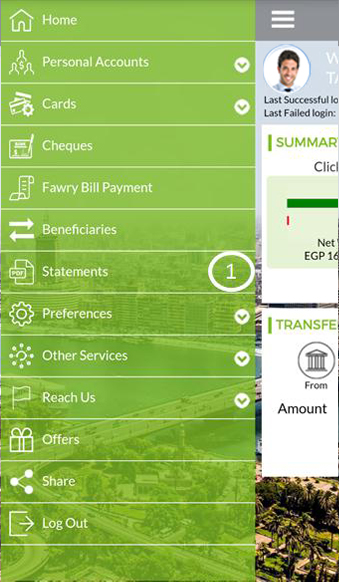
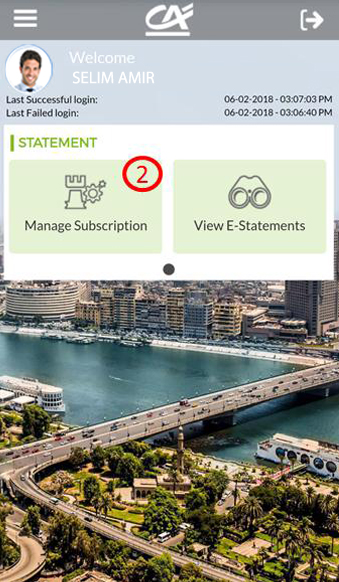
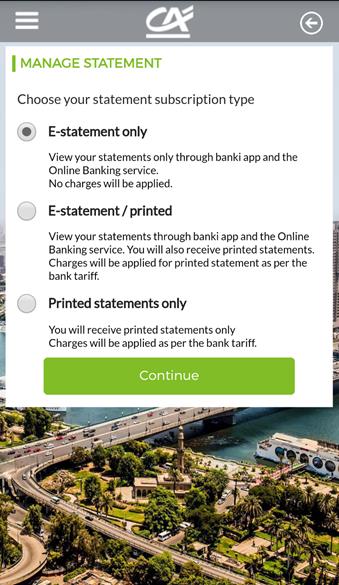
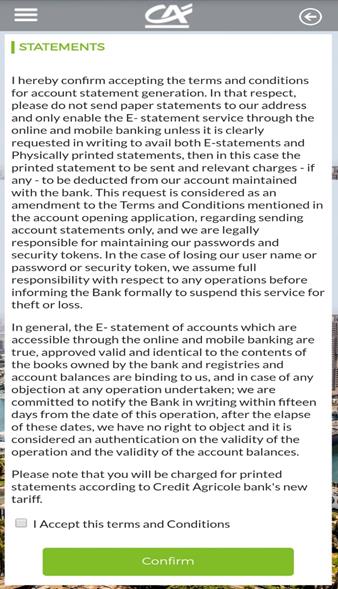
- Choose Statement > Manage Subscription and the available options will be displayed: E-statement only, E-Statement/Printed or Printed Statement only. After chosen the suitable mode, please accept the terms and conditions to apply the requested service.
-
- Please note that you will be charged for printed statements in case chosen.

- Last 12 months
-
- Choose Preferences > Settings >change Security Q & A to change them
-
- Choose a new security questions and answers> enter your token authorization code for verification> click continue
