Crédit Agricole, Go to Home page
Frequently Asked Questions

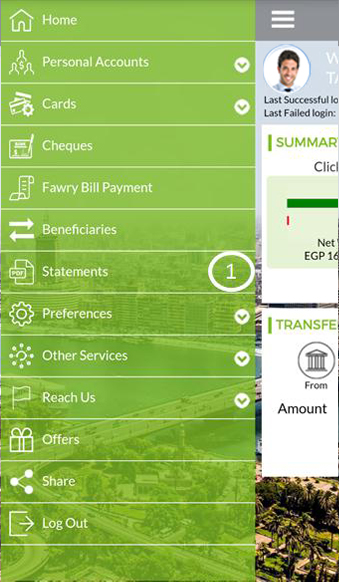
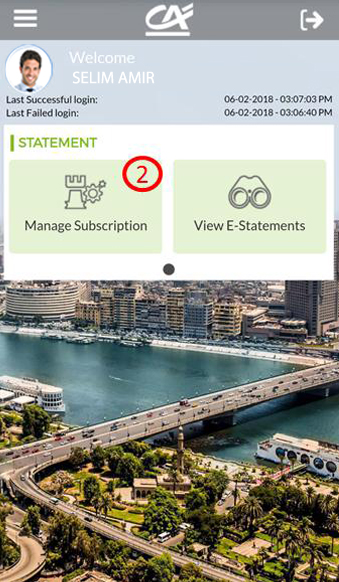
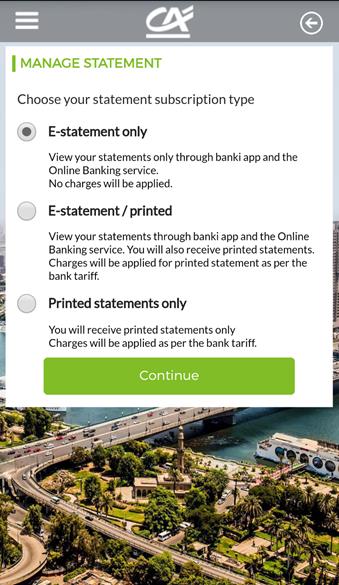
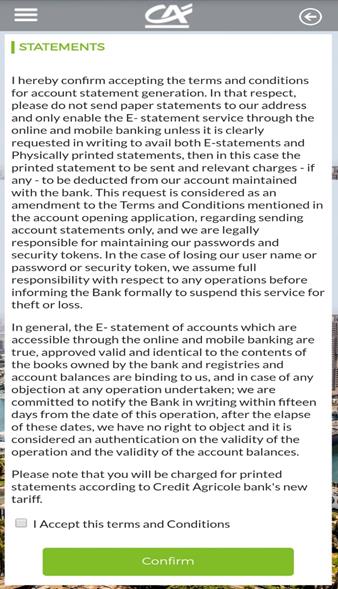
Subscribe in E-statement:
  • For credit card and personal account and avoid charging fees for issuing printed statements
  • For the E-statement Registration, click here

  • Transfer money from your account to your card. (no token needed)
  • To settle your credit card from your account on banki Mobile Click here 

  • This Transfer is free till further notice.
  • To activate your token Click here
Steps to transfer to other cards in other banks inside Egypt:
    1. Choose “Transfers/Payments”.
    2. Then choose “banks inside Egypt”.
    3. Click “from” and choose your account number.
    4. Then click “to” and choose “banks inside Egypt”.
    5. Then fill in all the required fields & add the card number in the account number field.
    6. Then add the amount.
    7. Press “continue” & choose transfer/payment reason.
    8. Enter the “TOKEN” & press confirm”.

Easily follow these simple steps:
  • click on “Forgot your PIN“ to retrieve/reset your PIN click here

Others

  • You can even select your beneficiary from your mobile contact list.
  • This transfer is free of charge
  • Start using banki Wallet to pay your bills
  •  you pay different bills remember to set them as “favorites” so you can easily pay them again next time.
  • To register & activate banki Wallet click here
  • to Send Money through banki Wallet: click here

  • Hassle free payment at home.
  • Receive now a “ Request to pay “ on banki Wallet from the merchant to pay your transaction in no time with simple steps
  • to know more click here

Just follow the below steps

  • Select “payment” from home page.
  • Select “clubs subscriptions
  • Select the club you need to renew its membership subscription.
  • Enter the “membership ID” which is written on your membership card.
  • Payment details will come up, select pay.
  • Use the M-pin code of banki Wallet and confirm.
  • Payment done.
  • to know more about the Steps click here
  • Terms & conditions apply

  • Select “payment” from home page
  • Select “utility” from service type
  • Choose the “utility bill” you need to pay
  • Add the “subscriber number” on the utility receipt and confirm.
  • Payment details will come up, select pay.
  • Use the pin code of banki Wallet and confirm.
  • Payment done.
  • For steps  click here

  • Start using banki Wallet to pay your bills
  • As you pay different bills remember to set them as “favorites” so you can easily pay them again next time
  • To register & activate banki Wallet click here
  • To link you account using banki Wallet click here
  • To link you card using banki Wallet click here